Your logo, your domain
Branded portal on your own URL. Not a subdomain. Not a page inside someone else's site. Your business, your identity.
Portal for file sellers
Your logo. Your prices. Your customers. TuningBay stays underneath as the engine - S.O.L. produces and reviews files, with 22 years of tuning work and dyno data behind every solution.
See pricing →Two channels at once: your branded portal on your domain + direct sales on TuningBay
One operating stack - not two disconnected businesses
980k+ coverage records - 115+ brands - 8.7k+ ECU/TCU profiles behind you
You get a fully branded portal on your own domain - logo, pricing, customer groups, newsletter, file history and statistics. TuningBay stays underneath as the engine: S.O.L., operators and 22 years of proven solutions. Your customers never see TuningBay. They see you.
This is a white-label tuning file portal - but we prefer to call it what it actually is: your tuning file business, running on our infrastructure.
Branded portal on your own URL. Not a subdomain. Not a page inside someone else's site. Your business, your identity.
Set custom pricing per dealer group, per customer, per region. No flat-rate ceiling. You decide what your market pays.
Newsletter, latest posts, file history and communication - all inside your portal. You own the relationship, not a marketplace.
Sell through your branded portal and on the main TuningBay domain for extra reach. One operating system, not two businesses to manage.
The free gains widget embeds the TuningBay stock-vs-tuned preview on your own website. Use it as a small lead tool before a customer opens a file request.
Use the free widgetNot every job is the same. Some need speed, some need your hands on the wheel, some need a proven base. TuningBay gives you three production paths - and you decide which one handles each order.
S.O.L. writes the file on top of 22 years of proven, dyno-backed changes. One safe tune per job, checked before it goes out. This is the fastest path for everyday orders - Stage 1, Stage 2, DPF, EGR, AdBlue and standard gearbox work.
Prefer to work your own way? Drive your own WinOLS through WinOLSbot - your projects, your mappacks, your Damos, A2L and KP assets. Your know-how stays yours. The portal runs the flow around it: order intake, delivery, communication, history.
For sellers who operate on a script base, there is a dedicated script-database tier. Arranged privately, case by case, so it fits how you already work.
On any path, you can open the workspace, inspect what S.O.L. or WinOLSbot produced, finish the file by hand, then publish and notify your customer. Manual control is never far away.
S.O.L. is not a chatbot bolted on at the end. It is a specialist AI model, trained on 22 years of real tuning files, logs and operator decisions.
It reads ECU and TCU binaries, understands calibration structure and dependencies, and builds changes inside its own BIN editor - bit by bit, where the file requires it.
S.O.L. understands the ecosystems you already work in - WinOLS, ECM Titanium, StageX - but its core value is deeper: direct binary analysis and its own internal BIN editor.
As far as we know, TuningBay is the first in the car tuning industry to use an AI MoE approach for real ECU/TCU file work. Most companies that say AI tuning are still running scripts and presets.
S.O.L. does not paste tuning templates. It reads the binary, understands the task and builds the change inside its own BIN editor.
Mission Control is the heart of your portal. It keeps live updates, queue awareness and delivery context in one place - so you move fast without losing the discipline that protects your business and your customers.
Catch what needs attention through real-time workspace updates - instead of juggling email, chat and separate back-office tools.
The portal behaves like a working desktop with real workspace views, not a flat contact page pretending to be software.
Review what S.O.L. or WinOLSbot produced, switch to operator flow, open the inspector and keep control over final delivery whenever a job is too important for blind automation.
Keep orders moving, review releases and answer customers cleanly - even when you are traveling, in a meeting or away from the workshop.
The tools that usually get scattered across four different apps - pricing, communication, statistics, catalog - live inside one stack.
Custom prices for dealer groups, selected customers or direct buyers. Without rebuilding your whole offer around one flat rate.
Keep your customer base warm with cases and updates inside your own portal flow - not through a separate mass-mail platform.
Track work done, keep file and log context together, get a clear view of what moves through your business - without exposing more than needed publicly.
Use the TuningBay power gains catalog inside your portal to show realistic stock-vs-tuned figures. Or feed it by API into your own offer layer for more reach without more manual maintenance.
Import your own mappacks, work with your Damos, A2L and KP assets. Create custom mappacks, export them, reuse completed work - instead of starting from zero every time.
The portal is not just an upload form. These are the working tools a seller can use inside the same operating stack.
S.O.L. is the file-production layer behind the portal. It creates and checks ECU/TCU files using real calibration work, logs and operator decisions collected over 22 years.
For a seller, that means the portal can take orders before the business owns a complete WinOLS file base. The customer sees one branded workflow while file creation stays inside the same stack.
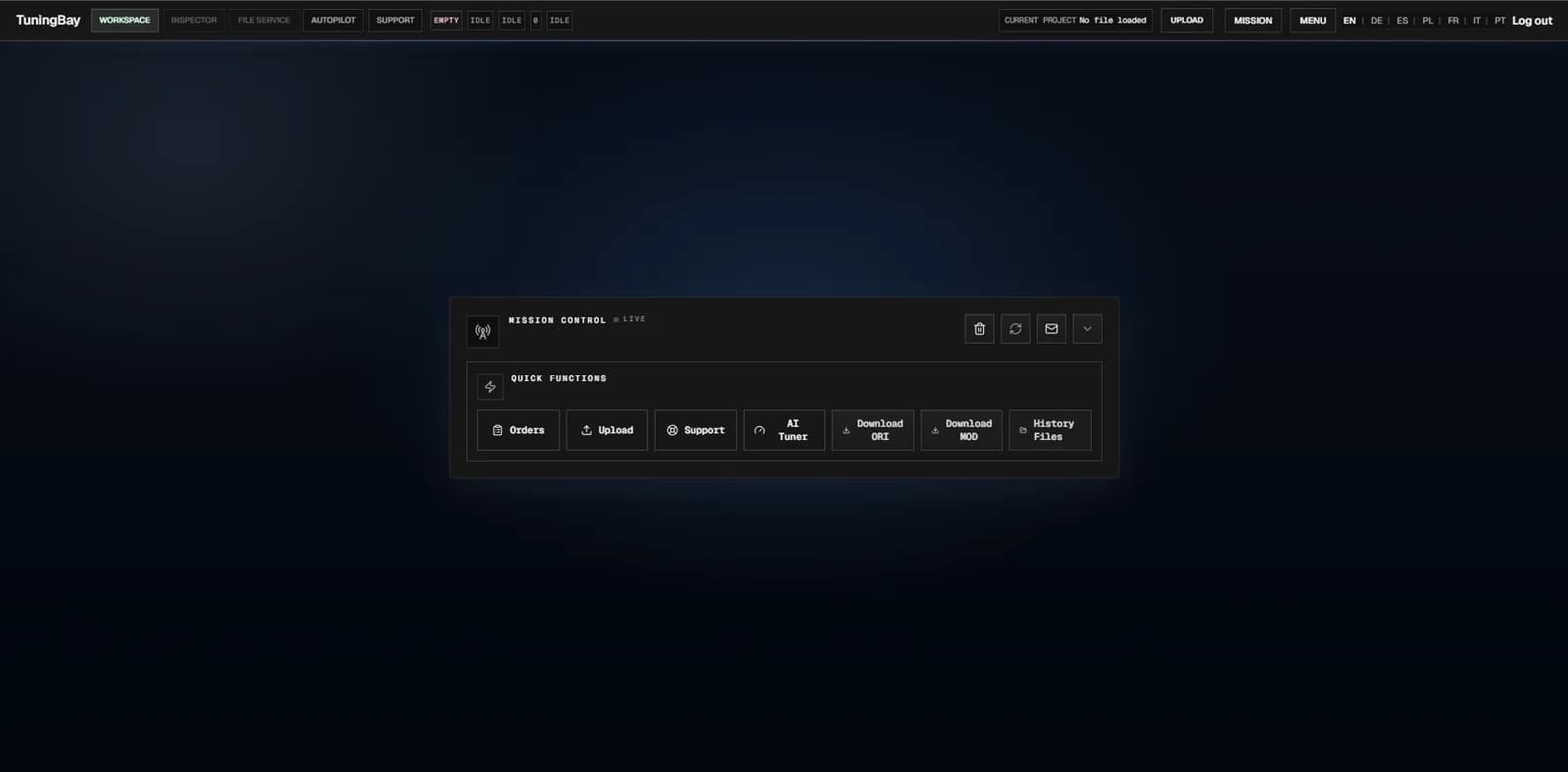
Mission Control is the job desk for uploads, order state, file history and release context. It keeps the work visible without spreading the case across inboxes and chat threads.
Operators can see what is loaded, what is waiting and which file was delivered. That makes repeat work easier to trace when a customer comes back later.
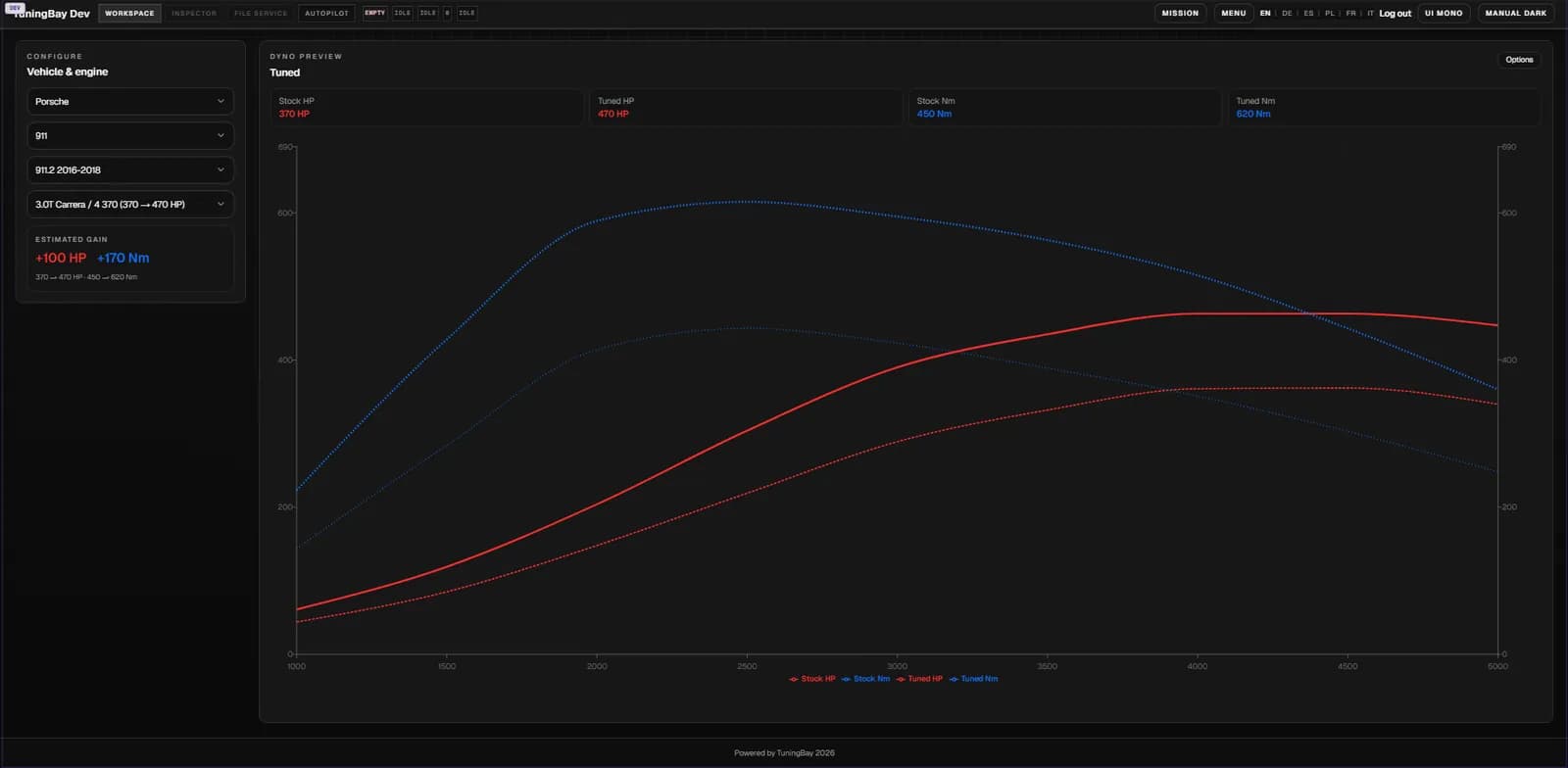
The gains catalog gives stock-to-tuned power and torque estimates for supported vehicle entries. It helps sellers answer the common Stage 1 and Stage 2 question without writing the same estimate by hand.
Those figures can sit inside the portal offer flow and support catalog pages. They are estimates, not dyno proof, so the sales path stays useful without overpromising.
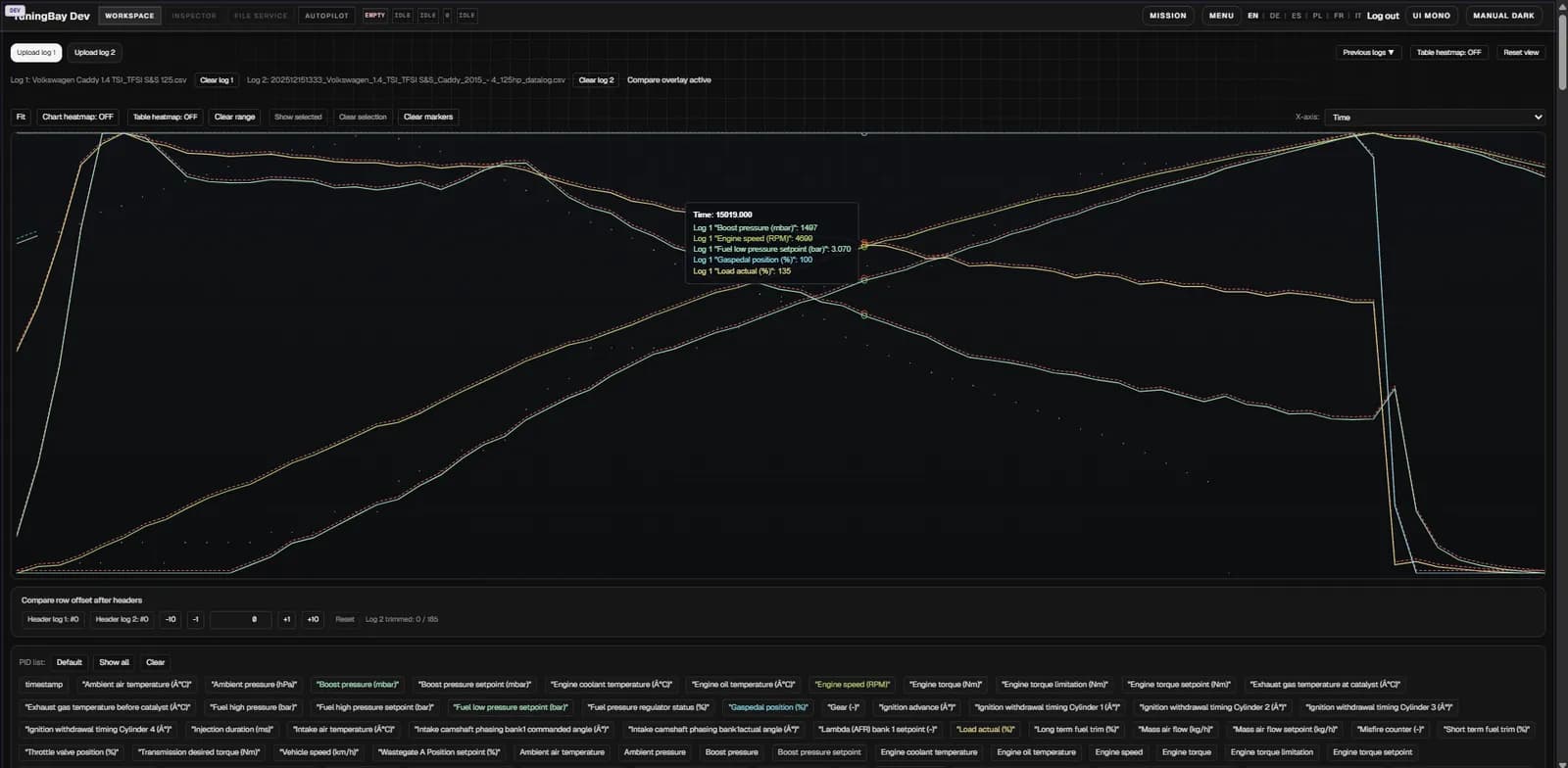
Logger tools store CSV logs, keep primary and secondary slots, and let a seller inspect or compare runs. Linked logs can travel with the file request instead of living in a separate folder.
That gives support cases more context. A file, a customer order and the related log evidence can stay close enough for faster review.
The mail tools handle customer lists, templates, campaign queueing and unsubscribe links. Latest posts can also feed a newsletter flow from inside the portal stack.
This gives a tuning business a way to bring customers back after delivery. It is basic operational marketing, not a separate mass-mail platform to maintain.
WinOLS Bot is optional for sellers who already have their own WinOLS database. They can plug that database into the portal flow and keep using their projects, mappacks and file knowledge.
The portal still handles intake, queue, credits, history and delivery around it. Sellers without a WinOLS base can stay on the S.O.L. file-production path instead.
Credits, reservations, billing events and subscription status live next to the file workflow. That keeps payment state close to the job that consumed it.
Portal subscription plans and PayPal checkout are part of the same commerce layer. Admins can see plan state and billing history without building separate billing screens.
Tenant controls keep branding, domain setup, customer groups, pricing and workspace identity separated per portal. A seller can present the service as their own customer-facing operation.
Customer data, order history and visible branding stay scoped to the tenant. That separation matters when multiple businesses run on the same underlying platform.
AI Tuner is a separate subscription, available to portal sellers who want to go deeper than file delivery. It is not part of the white-label portal - your customers do not see it. It is a tool for you.
AI explains the strategy: which maps matter for your goal, the logic behind Stage 1 and Stage 2, dependencies between maps, and what risk you need to control.
AI checks your completed work. Compares before and after, flags red lines, identifies missing changes and highlights risk areas.
Advanced, limited-access mode. AI helps you perform work under your control - guided execution where you stay in the driver's seat.
TuningBay does not treat AI like a magic button. S.O.L., WinOLSbot and plain operator file service are separate tools inside one controlled flow - and you decide which one handles each job.
Your customer gets a clean path: buy, upload, wait for the update, receive the result, stay connected to your business. Latest posts and newsletter flow keep that relationship alive - without you maintaining a separate marketing platform just to tell people what has been happening in the workshop.
When you run a portal, you sell the same depth of coverage that TuningBay offers on its own domain. 980k+ coverage records across 115+ brands, 8k+ models, 15k+ engine variants and 8.7k+ ECU/TCU profiles.
Your customers search by make, model, engine, ECU or software version - the same catalog that powers TuningBay, branded with your logo.
Show realistic stock-vs-tuned power and torque figures inside your portal, drawn from 22 years of dyno data and real-world results. Or feed the gains catalog by API into your own offer layer.
Your logo. Your prices. Your customers. S.O.L. and 22 years of file work behind every delivery. One stack, two channels, full control.